As an Amazon Associate, we earn from qualifying purchases. Some links on this site are affiliate links at no extra cost to you. Our recommendations are based on thorough research and editorial judgment.


Troubleshooting Common Instant Camera Problems

When troubleshooting common instant camera problems, we should start by checking if the film is fresh and properly loaded to avoid any ejection issues. Inspecting the camera for visible damages or blockages is essential. We can enhance photo quality by confirming good lighting while shooting and allowing film to develop undisturbed for 90 seconds. Regular maintenance, like cleaning the viewfinder and lens, guarantees clarity too. If issues persist, we might need to seek expert help – there’s more to explore!
Key Takeaways
- Ensure a fresh film pack is loaded and properly seated to avoid camera malfunction.
- Check for visible damage or blockages before troubleshooting to rule out physical issues.
- Test the camera in bright light, as low-light situations can affect performance.
- Allow film to develop undisturbed for 90 seconds to achieve optimal picture quality.
- Regularly clean the camera and store it at stable temperatures to maintain performance.
Common Issues With Instant Cameras

You may be interested



You know, when it comes to instant cameras, there are a few typical hiccups that can really put a damper on the fun. For instance, if you’re using a vintage model like the Polaroid SX-70, you might find that it struggles a bit in low-light indoor situations because its ISO ratings aren’t the best. It’s always a good idea to scout out well-lit areas or use a flash, if you can, to get better shots.
Then there’s the pesky issue of film ejection. Sometimes the film won’t pop out as it should, and that could be due to a blockage in the film slot or maybe you didn’t load the cartridge properly. Take a minute to double-check that everything’s in place before you snap that picture! Additionally, be aware that if you open the camera back after loading the film, it can expose the photos to light, leading to blank images.
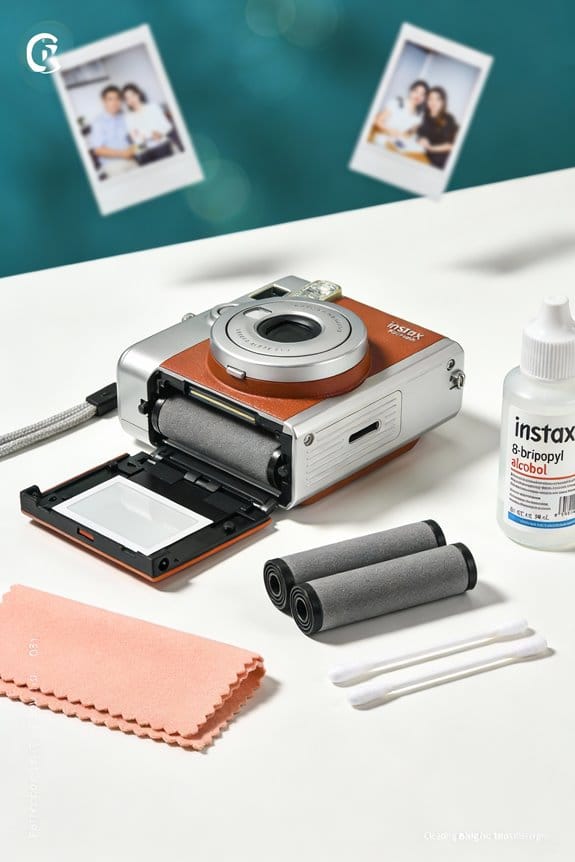
Regular maintenance is super important. Make sure you’re using fresh film and that the camera is clean and free of dust. Staying on top of these little details will help keep your instant camera happy and your photos looking great. Using specialized cleaning tools can effectively maintain camera performance and image quality. Now, if you’re keen, let’s chat about how to choose the right instant film for your needs!
Recommended Products

Items Included:1 x Leica Q3 Compact Digital Camera, 1 x 3 Piece Filter Kit, 1 x Sandisk 64GB Extreme Pro Card, 1 x Corel Photo Software, 1 x Deluxe Soft Case, 1 x 12_inch Flexible Tripod, 1 x Cleaning Kit

INCLUDED - Fujifilm X-T5 Camera, XF 16-80mm Lens, Battery, Adapter, USB Cable, Strap, Body Cap, Hot Shoe Cover, SD Card, Bag, Extra Battery, Charger, Filter Kit, Screen Protector, Cleaning Kit & More!

INCLUDED – Fujifilm X-T5 Mirrorless Camera, XF 16-80mm f/4 R OIS WR Lens, Battery, AC Adapter, USB Cable, Strap, Body Cap, Hot Shoe Cover, Lens Caps, Hood, Cloth, Fujifilm 1 Year Limited Warranty. Bundoled with 128GB SD Card, Extra Battery, 72mm Filter Kit (UV | CPL | FLD), Cleaning Kit.
Troubleshooting Non-Functioning Cameras

Troubleshooting non-functioning cameras can be a bit of a hassle, but don’t worry—I’m here to help you sort things out so you can get back to snapping those unforgettable shots! First up, let’s make sure you’ve got a fresh pack of film in there. A lot of camera issues actually stem from problems with the film itself, rather than the camera being broken.
Next, take a good look at your camera for any visible damage or anything that might be blocking the back cover. Sometimes, a simple blockage can cause all sorts of problems. And if you’re testing it out, try doing so in bright light. Better lighting can really help improve your exposure chances.
If your camera spits out the dark slide right away, that’s a good sign—the electrical parts are still functioning. On the other hand, if nothing happens after trying a few different film packs, we might be dealing with a bigger issue that could require some hands-on testing or repairs. Keep at it, and soon enough you’ll be clicking away again! Speaking of repairs, let’s chat about some options to consider if the troubleshooting doesn’t do the trick. It’s also important to make sure you are using the correct film compatibility for your specific instant camera model to avoid common malfunctions.
Recommended Products
INCLUDED - Fujifilm X-H2 Body, 128GB SD Card, Extra Battery, Cleaning Kit, plus all standard accessories and a 1-Year Limited Warranty for comprehensive coverage.

World's first1 201 MP 1" Exmor RS stacked back illuminated CMOS, High resolution 4K movie recording with direct pixel readout and no pixel binning, Super slow-motion movie3 HFR (High frame rate) up to 960 fps (40x)

Evaluating Film Loading and Development

Loading your film correctly is vital if you want to capture those amazing moments, because if you mess it up, it can turn into a real headache. First things first, make sure the film cartridge is seated properly and that you’ve got some film left. If your camera isn’t ejecting after you try to take a shot, check for any obstructions in the film slot and give the camera a good clean. It’s surprising how a little dust can cause problems!
Once you’ve taken a shot, let that film develop undisturbed for a solid 90 seconds. This is crucial because it gives the chemicals time to spread evenly, which really makes a difference in picture quality. Think of it like letting a cake cool before frosting; rushing that can lead to a mess! And whatever you do, don’t open the camera back after loading the film. If you do, you risk exposing the film to light, which will leave you with disappointing blank photos. So, just be mindful as you go through the process.
Using film with a fast developing time ensures your photos are ready quickly while maintaining vibrant colors and sharpness.
With all that in mind, you’re on your way to capturing some fantastic shots! Now that you’ve got the film loading down, let’s chat about how to get the best results from your shooting technique.
Recommended Products

【Full Set Mirror Photo Booth with Camera & Printer】Built-in PC with Instant Printing & Full Accessories,Runs smoothly on an Intel i5 mini PC (8GB RAM + 256GB SSD) and includes a 2000D DSLR camera, CP1500 printer, 108 sheets of 4x6 photo paper, and 3 color cartridges.Equipped with durable flight case with wheels, 2 sets of fun props, and a red carpet for a premium photo experience. Perfect for weddings, parties, malls, and brand activations
DSLR Photo Booth Machine: 15.6-inch oval touchscreen, built-in capacitive touch technology, host Intel i5 CPU + 8GB + 256 SSD.Simply touch the screen to take a photo and share it instantly online, or print it out with a connected printer

【Mirror Photo Booth Built-in PC】This Mirror Photo Booth is equipped with an Intel i5 processor, 8GB RAM + 256GB storage (Windows 11 system), and a responsive 15.6-inch capacitive touchscreen, ensuring smooth and stable performance. The complete package includes a DSLR camera, printer, 108 sheets of photo paper, 2 ink cartridges, flight case, fun props, masks, and a red carpet, delivering a professional Mirror Photo Booth experience
Flash Unit and Viewfinder Problems
Hey there! Now that you’re comfortable loading film into your instant camera, let’s tackle a couple of common hiccups that can pop up during your shooting adventures: the flash unit and the viewfinder. First things first, the flash unit. Make sure your 2xAA batteries are charged and inserted correctly. If your flash isn’t firing, that might be the culprit! Also, give the flash bulb a quick inspection—if it’s damaged or missing, it won’t work at all.
Now, onto the viewfinder. Sometimes, a bit of dirt or something blocking the lens can make your images come out blurry. Grab a microfiber cloth and give it a gentle wipe. If you’re still seeing those blurbs in your photos after that, it may be time to swap out some components, which usually means you’ll need to remove the camera’s back cover. By checking these things, you’ll boost your instant photo game and capture those special moments with ease. Using a blower brush for cleaning can also help remove dust from hard-to-reach places. Ready to learn more about caring for your instant camera? Let’s keep going!
Recommended Products

20.8MP FX-Format CMOS Sensor

【FEATURES OF MAGIC MIRROR PHOTO BOOTH】: Magic mirror photo booth machine build-in 32inch capacitive touch screen Capacitive touch technology build-in mini PC intel (i5+8G RAM+256G SSD) Win11 System,can be connected to a printer to instant printing photos (Camera and printer included). Framed by RGBW LED come with Ring light(3 modes:cold,warm,bright).touch the screen and start taking pictures.Let it record your best moments.

SONY USA AUTHORIZED - Includes Full SONY USA WARRANTY
Maintaining Optimal Camera Conditions
To get the best results from your instant camera, it’s super important to keep it in optimal camera conditions. Ideally, you want to store your camera in a stable environment, around 70°F, which helps prevent any mechanical issues. Think of it as a cozy home for your camera—too hot or cold can lead to problems down the line.
Regularly checking and cleaning the viewfinder and lens with a microfiber cloth is another simple yet effective trick. This way, you can capture those clear shots without any annoying distortions. And when it comes to film, be sure to store your cartridges in a cool, dark place. Just like food can spoil with too much light, your photos can get ruined if the film is exposed. Always using fresh, compatible film is crucial too—imagine trying to bake a cake with expired ingredients!
Lastly, getting familiar with your camera’s settings makes a world of difference. Adjusting them based on light conditions can help you dodge overexposure or underexposure issues. So, if you’re shooting in bright sunlight, tweak the settings to capture those vibrant colors without washing them out. And remember, if you keep running into the same problems, it might just be time to look into a replacement. With these tips in mind, you’ll be well on your way to capturing amazing moments! Using ISO ratings that match your film and camera settings ensures vibrant and clear photos every time.
Recommended Products

Sony USA Authorized. Bundle Includes: Sony PXW-Z190 4K 3-CMOS 1/3 inch Sensor XDCAM Camcorder, Professional LED 160 Video Light, 64GB SDXC High-Speed Memory Card, Soft Padded Carrying Case, 6 x 6 inch Straps (Assorted Colors), Cleaning Kit, Memory Card Wallet, SD Card USB Reader

A whole new level of camera intelligence from new AI processing unit. | Next-generation AF with Real-time Recognition autofocus deep learning AI
Superior Sensors: 1/2.3" Type MOS Sensor | UHD/HD Capture
When to Seek Expert Help
Hey there! So, when should we think about getting expert help for our instant camera problems? Well, if your camera won’t turn on even after you’ve swapped out the batteries, it might be time to reach out to a technician. A stubborn red LED light could mean something’s off inside. For instance, if you’ve tried everything and the camera still isn’t behaving, a quick chat with a pro can save you a lot of frustration.
And what about those times when the film just won’t eject? If you’ve checked for any blockages and made sure the film’s loaded correctly but it’s still acting up, that’s another good reason to call for help. When the lens won’t open or close no matter how many times you push the button, that’s definitely a sign that you may need repairs or a replacement part.
Let’s not forget about the flash! If it’s failing to fire even when you’re using fully charged batteries, you might be looking at issues with the flash capacitor. Plus, if you keep getting overexposed photos or weird colors, it could mean you need some expert guidance to nail down the root of the problem. It’s always better to ask for help than to let these issues get out of hand!
Next up, let’s talk about some simple maintenance tips to keep your instant camera in top shape and avoid those pesky issues altogether. Proper storage of instant film prior to use is also crucial to maintain print quality and prevent camera malfunctions.
Frequently Asked Questions
What to Do When Your Instax Camera Is Not Working?
When our Instax camera suddenly stops working, we usually ignore battery issues and film compatibility. Let’s check those batteries and film settings—funny how the simplest fixes often elude us, isn’t it?
How to Tell if an Instax Camera Is Broken?
We can tell if our Instax camera’s broken by checking its features; if it won’t turn on, lens fails to extend, or images don’t eject, it’s time to contemplate camera maintenance and repairs.
What Does a Red Flashing Light Mean on a Polaroid Camera?
A red light flashing on our Polaroid camera’s like a warning beacon. It usually signals battery issues or film exposure mistakes. Let’s check battery orientation and verify proper film handling for effective Polaroid camera troubleshooting.
How Do You Reset Your Instax?
To reset our Instax, let’s remove the batteries for about ten seconds, ensuring the camera’s off. This helps with camera maintenance and resets any temporary glitches. Always check the user manual for specific instax features.